Overall summary
Work IQ is the shortest path from SharePoint content to a working custom-built AI agent or app. You call Microsoft’s own intelligence over an API and skip the index, the pipeline, and the infrastructure completely. That makes it the right default when you want speed, wide coverage, and governance you get for free. It is the wrong choice when you need to limit it to specific sites, tune it, or host it yourself. Across the eight factors it rates Strong on seven, Security, Cost, Governance, Data residency, Retrieval quality, Scalability, and Data freshness, and Limited on one, Flexibility.
Reach for Work IQ when:
- You want the fastest path live, with no index, embeddings, crawler, or infrastructure to build or run.
- Your users are signed-in Microsoft 365 users and you want permission trimming, sensitivity labels, and enterprise audit inherited automatically, with no access-control code of your own.
- You want broad, Copilot-style reasoning across the user’s whole work context (SharePoint, email, Teams, meetings), not a narrow curated set.
- Cost and licensing matter: it is consumption-only with no per-user license, so you can even serve users who are not Copilot-licensed.
- You want current answers with no replication to own, and you value inherited governance and eDiscovery.
Look elsewhere when:
- You need to restrict grounding to a specific set of SharePoint sites or a curated document set. The raw API is user-level, not targeted (scoping is possible only by composing a scoped Copilot Studio or SharePoint agent over A2A, which is more work and currently in preview).
- You need your own or a fine-tuned model, or control over ranking, chunking, and retrieval.
- The scenario is unattended, background, service-account, or anonymous and public-facing. Work IQ is delegated, on-behalf-of-user only.
- Your policy mandates private networking. Work IQ is a public endpoint with no Private Link or VNet option.
- You are in a national cloud (GCC-High, DoD, or China), where these APIs are not available.
Bottom line: Let Microsoft own the intelligence when you want simplicity, broad user-level answers, and built-in governance. Own it yourself, through the Retrieval API with your own LLM or a custom Azure AI Search build, when you need to limit it to specific sites, choose the model, or tune retrieval. Those are the exact points where Work IQ’s limited flexibility becomes a problem.
Introduction
Work IQ is the intelligence layer behind Microsoft 365 Copilot and its agents. It combines your Microsoft 365 work data, the emails, meetings, documents, and chats, with the context around that data, such as relationships, preferences, and work patterns, and uses the combination to assemble context, ground responses, select skills, and invoke tools.
The Work IQ APIs open the same layer to your own applications. Instead of building and maintaining your own indexing, vector stores, and compliance pipelines, your application calls on the same intelligence that powers Copilot and lets Microsoft do that heavy lifting. For developers, this is a way to build agentic, AI-powered applications that reason securely over Microsoft 365 data while preserving the permissions, compliance, and governance controls already in place.
Because SharePoint documents are one of the work-data sources Work IQ already understands, pointing a custom agent at your SharePoint content needs no separate connector or index of your own. That is what makes Work IQ the most managed of the three options in this series, and the natural place to start.
In the rest of this article I put Work IQ through the eight factors from the introduction, one at a time, to show where it is the clear choice and where its constraints begin to bite.
A few things to know first
- Work IQ supports the REST, MCP, and Agent-to-Agent (A2A) protocols, so you can leverage it across a range of scenarios.
- The Work IQ Dev Tools (CLI) are in preview at the time of writing.
workiq.svc.cloud.microsoftis the dedicated cloud gateway endpoint for Microsoft’s Work IQ service, through which custom AI agents and applications securely access and reason over Microsoft 365 data.- App-only authentication is not supported. Work IQ is delegated, on-behalf-of-user only.
Security
What I am looking for: whether the solution honors SharePoint’s existing permissions so users only reach content they are entitled to, and how the user’s identity is carried through to that content.
Two questions drive the approach. First, how does my client application (a web app, a mobile app, or a service) authenticate its users? Second, once a user is authenticated, how do I surface only the SharePoint content that user is authorized to see?
Work IQ answers the second question cleanly, and this is its biggest security strength. The API is delegated, on-behalf-of-user only. Every request carries the signed-in user’s identity, so Work IQ returns only the content that user can already access, and it honors sensitivity labels and compliance policies automatically. You write no permission-trimming logic. You maintain no access-control lists of your own. The trade-off is that application-only access, the background or service-account kind, is not supported. So Work IQ does not fit anonymous, public-facing, or unattended scenarios where there is no signed-in Microsoft 365 user.
That leaves the first question, authenticating your users, which is where the integration effort actually lives. If your client app already authenticates against Microsoft Entra ID, the path is short: register an Entra application and grant it the delegated WorkIQAgent.Ask permission (api://workiq.svc.cloud.microsoft/WorkIQAgent.Ask, admin consent required), after an administrator has enabled Work IQ in the tenant.
If your app uses a third-party identity provider instead, you first have to establish federation and trust between that IDP and Microsoft Entra ID, and the effort depends on the IDP in question. Either way, the end user must resolve to a real Entra identity that maps to their Microsoft 365 permissions, so a purely external user with no Microsoft 365 presence cannot be permission-trimmed against SharePoint at all.
For reference, Work IQ exposes two delegated permission scopes: WorkIQAgent.Ask, which lets the app ask any Work IQ agent on behalf of the user, and WorkIQAgent.Ask.Selected, which restricts the app to the agents your organization has selected. Both require admin consent.
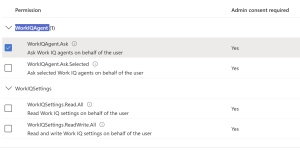
Work IQ delegated permissions in the Microsoft Entra portal.
Bottom line: Strong. Permission trimming comes through delegated identity, with no access-control or authorization code to write. The only friction is federating a non-Entra IDP. The only real limit is that unattended and anonymous scenarios are off the table.
Networking and security model
Work IQ APIs operate entirely within the Microsoft 365 trust boundary, so they inherit the same networking, identity, and compliance model as services like Microsoft Graph, SharePoint Online, Exchange Online, and Teams. Because Work IQ is a Microsoft-managed cloud service rather than an Azure resource you host, there is nothing to deploy inside your own network, and in most environments there are no customer networking changes required to consume it from a client application.
Service endpoint architecture
All Work IQ API traffic flows to a single Microsoft service domain:
https://workiq.svc.cloud.microsoft
This is a public, multitenant Microsoft 365 service endpoint reached over HTTPS. Public here means internet-routable, not open: it cannot be called anonymously, and every request requires a Microsoft Entra ID token and tenant authorization. In other words, it is secured by identity, not by network isolation, and it is reachable from anywhere Microsoft 365 is reachable.
No private networking
Work IQ does not use, and does not offer, any customer-side network integration:
- Virtual Network (VNet) integration
- Private endpoints or Private Link
- Customer-provisioned service endpoints
- Custom routing, peering, or region-specific endpoints
For most organizations this is a simplification, since there is no network plumbing to build. It is worth being clear about the flip side, though, because it matters in regulated environments: this also means there is no private-networking option. You cannot place Work IQ behind a private endpoint or bring its traffic onto a private network. If your policy requires that access to sensitive data traverse only private connectivity with no public egress, Work IQ’s public-endpoint model cannot meet that bar, and a custom build on Azure AI Search, which does support Private Link and VNet isolation, is the option that can.
Firewall and egress behavior
Work IQ uses outbound HTTPS (443) only. If your environment already permits outbound access to the relevant Microsoft endpoints, Work IQ works with no further change. Those endpoints are:
*.cloud.microsoft(the Work IQ service domain)login.microsoftonline.comand the related Entra sign-in endpoints (for token acquisition)graph.microsoft.com(if you use Graph, for example the MCP tools or file-URI context)
If your environment has a restricted egress posture, the only task is to allowlist those FQDNs on 443. There are no inbound rules to open, no new IP ranges or service tags to manage, and no ports to open beyond standard HTTPS, because Work IQ never initiates a connection into your network.
Identity and access control
Every Work IQ API call requires:
- A Microsoft Entra ID OAuth 2.0 token
- Delegated permissions on behalf of the signed-in user (application-only, app-only access is not supported)
- Tenant admin enablement and consent
Because access is always on behalf of a signed-in user, Work IQ enforces the Microsoft 365 data boundary automatically: it can only reach data that user is already permitted to access. The trade-off of the delegated-only model is that Work IQ does not fit unattended, background, or anonymous scenarios where there is no signed-in user.
No infrastructure or telemetry changes
Because nothing runs inside your infrastructure, there is nothing on your side to instrument or reconfigure: no APM agent changes, no reverse proxy or load balancer rules, and no network tracing setup. Client apps simply make authenticated HTTPS calls.
The one caveat to weigh, as noted above, is that this same model offers no private-networking option, a deliberate trade of control for simplicity. It holds even when the client app itself runs inside a restricted subnet, for example Azure App Service with VNet integration, since all it needs is that outbound HTTPS path.
Cost
What I am looking for: the three cost dimensions, licensing and billing, implementation, and operations.
Licensing and billing
Cost is one of Work IQ’s strongest points. There is no separate SKU, no subscription, no per-user license. You are billed only through Copilot Credits, Microsoft’s shared currency for AI services, at about one cent per credit, and this does not depend on Microsoft 365 Copilot licensing. That last point matters more than it first looks. You can serve users who do not have a Copilot license, as long as they are signed-in Microsoft 365 users with permission to the content. You do not have to buy a license for every user, which is often what decides this.
Consumption has two parts. Query operations, the Chat and Context APIs that perform grounding, retrieval, and reasoning, burn a variable number of credits that scales with data volume and reasoning depth, from a light single-document extraction to a heavy synthesis across many meetings and documents. Microsoft does not publish fixed numbers for these. Tool actions, any Work IQ Tool API call, carry a flat 0.1 credits each regardless of complexity.
Implementation
Low. The expensive work in a “ground AI on SharePoint” build is the data engineering, ingestion pipelines, an index, embeddings and chunking, permission-trimming logic, and LLM hosting, and Work IQ manages all of it for you. There is no infrastructure to deploy either, so at most you add an egress allowlist entry. What you actually build is small: register a Microsoft Entra ID app, grant it the delegated WorkIQAgent.Ask permission, and call the REST, MCP, or A2A endpoint, with Microsoft’s samples and CLI cutting down the setup code. The one real variable is identity, not AI. If your app already authenticates against Entra ID, integration is quick; if it uses a third-party identity provider, you first set up federation with Entra ID, which is where effort can grow.
Operations
Also low in effort, since Microsoft runs the intelligence, the freshness, and the permission trimming. The trade-off of pure consumption is that spend is variable and runtime-driven, so a chatty or reasoning-heavy agent can surprise you. Set Copilot Credit spend caps and monitor usage from day one.
Bottom line: Strong. No per-user license and no pipeline to build make this the cheapest of the three to start and to run at low-to-moderate volume. The one thing to watch is how many credits you use as usage grows.
Governance, including auditability and observability
What I am looking for: how well the approach fits enterprise controls, and whether you can see and prove what the agent retrieved and surfaced.
This is one of Work IQ’s strongest factors, because you get Microsoft 365’s full set of governance tools instead of having to rebuild them. Prompts and responses from Copilot and its agents are recorded in the Microsoft Purview audit log, along with details such as which service was used, which files were referenced, and any sensitivity labels those files carried. On top of that sit the familiar controls: sensitivity labels and their encryption, data loss prevention, retention policies (a dedicated “Microsoft Copilot Experiences” retention option), Communication Compliance, and Insider Risk Management, including a policy template aimed at risky AI usage such as prompt injection.
For observability, Purview’s Data Security Posture Management for AI provides reporting on interaction volume, sensitive interactions per app, oversharing risk assessments, and top labels referenced, with data appearing after about a day. And because prompts and responses are stored in the user’s mailbox, they are fully discoverable: you can search and export them through eDiscovery and hold them like any other record. That last point matters for a regulated reader, and it ties directly to the idea that agent interactions are themselves business records subject to retention, disposition, and legal hold.
The honest caveat is that this reporting is built for compliance and admin teams, delivered through Purview at the tenant level. It is not a developer’s tool for tracing or testing each query. You can prove what was accessed and shown, but you do not get detailed retrieval data to tune the system, and several of these controls need Purview premium or E5-tier licensing.
Bottom line: Strong. Work IQ gives you enterprise-grade auditing, eDiscovery, labels, DLP, and retention with no work on your part, and agent conversations become records you can audit. The limits are that the reporting is built for compliance teams, not developers who want to tune the system, and the richer controls need premium licensing.
Data residency
What I am looking for: where the content actually lives and travels, and whether it ever leaves the tenant boundary.
Work IQ’s core strength here is that the reasoning happens inside Microsoft’s boundary. Your application sends a prompt and receives an answer, but the content itself is not handed to a model you host, as it would be in the Retrieval-API-plus-your-own-LLM option, and it is not copied into a separate index you own, as it would be in the custom Azure build. Prompts, responses, and citations are encrypted at rest, stored in the user’s mailbox, and not used to train foundation models. Copilot is a covered workload under Microsoft’s data residency commitments, including Advanced Data Residency and Multi-Geo, and for EU customers it operates as an EU Data Boundary service.
The honest caveats matter for a regulated audience, because “Microsoft’s boundary” is not identical to “always your tenant’s region.” Large-language-model calls are routed to the nearest regional datacenters but can be routed to other regions during peak-capacity periods, so for customers outside the EU a query may be processed in the US, the EU, or elsewhere. EU traffic stays within the EU Data Boundary, with one notable exception: models provided by Anthropic as a subprocessor are currently excluded from that boundary. Microsoft also now offers in-country data processing for a set of countries for stricter sovereignty needs. None of these are reasons to avoid Work IQ, but they are the specifics a compliance team will want to confirm against their Data Protection Addendum.
Bottom line: Strong. Content stays inside Microsoft’s compliance boundary. It is never handed to your own model or copied into your own store, which is the cleanest residency posture of the three options. The caveats to verify are peak-capacity cross-region processing and the Anthropic-model exclusion from the EU Data Boundary.
Retrieval quality and citations
What I am looking for: how relevant and accurate the returned content is, how much control you have over ranking and chunking, and whether answers come back with trustworthy citations.
On quality and citations, Work IQ is strong, because it grounds on the same Microsoft 365 semantic index that Copilot uses, a hybrid lexical and vector index that Microsoft tunes, over the common document types including Word, PowerPoint, and PDF. Answers come back grounded and, importantly, with real citations: each response carries an attributions array with the source’s display name and a link straight to the underlying SharePoint document or Teams source, and messages can surface the source’s sensitivity label. For a regulated reader who needs to show where an answer came from, that out-of-the-box, permission-aware source attribution is a genuine strength.
The limit is control, and it is the exact opposite of the custom option. You cannot change how results are ranked, how documents are split, or how they are turned into vectors, and you cannot tune retrieval for a specific domain or a specialized set of documents. Quality is also limited by what is indexed, so the daily lag on brand-new documents from the freshness factor applies here too. If your case needs domain-specific tuning or a custom ranking approach, that is exactly where a custom Azure AI Search build is worth its cost.
Bottom line: Strong. You get high-quality, permission-aware answers with trustworthy citations and no retrieval engineering to build. The trade-off is control. You cannot touch how results are ranked or how documents are split, so a case that needs tuned, domain-specific retrieval will need more than this.
Flexibility
What I am looking for: how much control you keep over the model, the orchestration, and the user experience.
Flexibility is where Work IQ asks you to give up the most, and that is by design. Its whole value is that Microsoft owns the intelligence. The price is that you do not control it.
On the model, you have no choice. Work IQ uses Microsoft’s model. There is no bring-your-own-model, no model selection or version pinning, and no tuning of the reasoning. If your scenario needs a specific or fine-tuned model, this is not the option.
On orchestration and retrieval, the pipeline is closed to you. You cannot change how content is retrieved, ranked, split, or combined into an answer, and the request itself gives you almost no settings: a message, a timezone, optional file context, optional extra context, and a switch to turn web results on or off. You can push an answer in a direction by attaching files, but you cannot shape the ranking or the reasoning.
The sharpest limitation is site scoping, and it has two layers worth stating precisely. The raw Work IQ ask and chat API cannot target a specific SharePoint site or restrict grounding to a defined set of sites. It grounds across the entire Microsoft 365 estate the signed-in user can access and returns the most relevant results from anywhere in it. In effect the raw API behaves like a per-user Copilot over the user’s whole work context, not a curated knowledge base. So if you call Work IQ as raw intelligence and your goal is a solution aimed at a dedicated set of documents or sites, the raw API is the wrong tool: it gives you user-level grounding, not a targeted knowledge set.
Targeted knowledge is still achievable in Microsoft’s managed lane, but through composition rather than an API parameter, and on the same engine. Scoping lives in the agent layer, not the grounding call. You author a scoped agent, a Copilot Studio agent or a SharePoint agent, with specific sites or documents as its knowledge sources and ungrounded responses turned off, then address that agent by its agent ID over the Work IQ A2A endpoint. The agent grounds only on its configured sources, permission-trimmed to the user. Two permission scopes bound this: WorkIQAgent.Ask lets the app call any agent, while WorkIQAgent.Ask.Selected restricts it to the agents your organization has selected. So the managed lane can deliver targeted, permission-aware scoping, it just takes a scoped agent plus A2A addressing rather than a single stateless API call, and that path is currently in preview.
On the user experience, you own your application shell, how you present answers, and the citations Work IQ returns for you to render, and a streamed response mode helps you build something responsive. But the substance of the answer, its reasoning and phrasing, is Microsoft’s. Behavior customization such as a persona or custom instructions is not something you set per request; it lives in the agent definition, which again points you toward authoring an agent rather than tuning a call.
Where Work IQ genuinely is flexible is integration, not intelligence. You can consume it over REST, MCP, or A2A, plug agents together, and use Work IQ Tools to act on Microsoft 365 entities, so you have real freedom in how you wire it into an application. What you cannot do is change what the engine is or how it thinks. And because every layer, the model, the index, the reasoning, and the identity, is Microsoft’s, lock-in is high and portability is low; moving off Work IQ means re-architecting the grounding entirely.
Bottom line: Limited. You keep your application’s user experience and how you integrate, over REST, MCP, or A2A. You give up the model, the retrieval and orchestration, and portability. Targeted site scoping, the capability most likely to decide this factor for a document-centric solution, is not available from the raw API. It is reachable only by composing a scoped Copilot Studio or SharePoint agent addressed over A2A. If deep control over the model or retrieval is the requirement, that is the signal to move to the Retrieval-API-plus-your-own-LLM option or a custom build.
Scalability
What I am looking for: the ability to handle large volumes of content, many sites, and concurrent load, and where throttling limits bite.
On the first part of this factor, data volume and multiple sites, Work IQ is effectively unlimited and needs nothing from you. It grounds on Microsoft’s tenant-wide semantic index, which is built to handle very large volumes across all Microsoft 365 content, so it already covers every SharePoint site and all of your content. Adding sites or growing volume changes nothing on your side, because you are not the one indexing anything. This is also where Work IQ avoids the hardest scaling problem of the custom Azure AI Search path. Since you never run a crawl, you never hit the Microsoft Graph limits that slow down a large-tenant crawl. The scale problem is simply not yours.
The real limits are at request time. Microsoft scales the compute for you, so you set up no servers, but each request is subject to service-protection limits. Work IQ does not publish a specific per-user request limit (those calls fall under standard Microsoft 365 throttling), so your application must handle 429 Too Many Requests by waiting the time the Retry-After header asks for, and 503 responses by backing off and retrying. This retry handling is a required part of any production build, not an optional one.
The real ceiling, though, is cost, not capacity. Because you pay per use in Copilot Credits, scaling up means spending more, not adding servers, so your budget is the real limit. Microsoft gives you spend controls for this: monthly spending caps at the organization and per-user level, alerts, and a usage dashboard that refreshes about every two hours. One thing to plan for: when a spending cap is reached, users lose access for the rest of the month rather than going over budget, so a cap set too low becomes an outage, not just an alert.
One hard boundary worth stating for a regulated audience: the AI Copilot APIs, Work IQ included, are not available in the national cloud environments (GCC-High, DoD, and China), so those tenants are out of scope entirely.
Bottom line: Strong. Content and site scale are effectively unlimited and effortless, since you inherit Microsoft’s index and never crawl. The caveats are that you must handle throttling and backoff at query time, and that real-world scale is limited by your Copilot Credit budget and spend caps, not by infrastructure.
Data freshness and latency
What I am looking for: how quickly a change in SharePoint is reflected in the agent’s answers, and what drives any delay.
Work IQ’s biggest strength here is what you do not build. Because it grounds on Microsoft’s own index, there is no replication layer you own, no crawler, no sync pipeline, and no index to keep current. You query Microsoft’s index and inherit its freshness for free, so the usual worry about replication lag does not apply, there is no replication step of yours to fall behind.
To understand the freshness you do get, it helps to see how the index is layered. Microsoft Graph holds the content, Microsoft Search is the traditional keyword index that crawls SharePoint Online automatically and continuously, and the semantic index is a vector layer built on top of Microsoft Search that is what Copilot and Work IQ actually ground on. The base search layer picks up changes to existing content automatically, usually within minutes. The semantic layer on top, however, refreshes on its own cadence, and that cadence is tiered.
That tiering is the part worth stating precisely, because “up to date” is not uniform:
- Updates to an already-indexed document are indexed immediately. Edit an existing SharePoint document and the change is reflected right away, in practice within minutes.
- Brand-new SharePoint documents (those accessible by two or more users) are added to the semantic index on a daily cadence. So a freshly created document may not be answerable for up to a day, because the semantic layer re-indexes new content on a daily cycle even though the base search index crawls continuously. You cannot accelerate this; the timing is Microsoft’s, not yours.
For a knowledge base of existing, evolving content this is excellent. For a scenario that depends on a brand-new document being available within minutes, such as a policy published this morning, the daily first-indexing lag is a real limitation. One practical mitigation is to pass that specific document’s URL as file context on the request, which grounds the answer on it directly even before it reaches the semantic index. Permission changes are enforced at query time against the user’s live access, so trimming stays current, though Microsoft does not publish a specific propagation figure for permission changes.
On latency, per-query response time is LLM-grade, since Work IQ performs retrieval and reasoning server-side. It is interactive for typical question-and-answer use, and a streamed response mode is available to improve perceived responsiveness. The constraint to know is that the API is not designed for long-running tasks: complex, heavy synthesis can hit gateway timeouts, so Work IQ suits interactive querying rather than long background jobs, and you cannot tune the latency because the model and retrieval are Microsoft’s.
Bottom line: Strong. You inherit Microsoft’s freshness with no replication to own, and edits to existing content reflect immediately. The honest caveats are that brand-new documents can take up to a day to first index, and that heavy, long-running queries risk timeouts.
Scorecard
| Factor | Work IQ APIs | In one line |
|---|---|---|
| Security | Strong | Automatic permission trimming and label enforcement via delegated identity; no access-control code. |
| Cost | Strong | No per-user license, consumption-only; cheapest to start, watch credit spend at scale. |
| Governance and observability | Strong | You get Purview audit, eDiscovery, labels, DLP, and retention; built for compliance teams, not for tuning. |
| Data residency | Strong | Reasoning stays in Microsoft’s boundary; verify peak-capacity routing and the Anthropic-model EU exception. |
| Retrieval quality and citations | Strong | High-quality grounded answers with real citations; no control over ranking or how documents are split. |
| Flexibility | Limited | No model choice, no retrieval control, and no site scoping from the raw API. |
| Scalability | Strong | Effectively unlimited content and sites; handle throttling, and mind Copilot Credit spend caps. |
| Data freshness and latency | Strong | No replication to own; edits index immediately, new documents up to a day. |
Where this leaves us
Work IQ is the managed default. It is the fastest way to give a custom agent broad, permission-aware, well-governed intelligence over SharePoint, with almost nothing to build or run. Its one weak point is flexibility, and in particular the fact that the raw API cannot be limited to a chosen set of sites, or let you control the model and retrieval.
In the next article I take the second option, the Copilot Retrieval API paired with your own LLM. It trades some of that managed convenience back for control. Microsoft still returns permission-trimmed grounding, but you own the model, the prompt, and the answer.
Start with Work IQ when the intelligence should be Microsoft’s. Move past it when you need the control yourself.
Written by Venugopal Reddy P. I write about governance, compliance, AI, and automation at AK Tech Hub. Views are my own, and product details in this fast-moving space change frequently, so verify current capabilities and pricing before making decisions.


Leave a Reply