In today’s AI world, “agent” is a common word. But these agents come in different flavors, with different capabilities, different targeted purposes, and different underlying technology. If you’re a Microsoft shop running M365 and Azure, it’s worth understanding the key differences, how each can benefit you, and the cost that comes with them.
The way I think about it, Microsoft has two towers, pro-code and low-code/no-code. The pro-code tower offers enterprise-grade AI capabilities to build into custom applications. The low-code/no-code tower is aimed at boosting personal and team efficiency, while still being able to deliver enterprise-grade solutions. Almost everything Microsoft ships in the agent space slots into one of these two towers, and once you can place an agent on the map, most of the confusion disappears.
This article walks the map. I’ll cover the four agent types, where each one physically lives, how it grounds its data, what it costs, and (the part regulated industries can’t skip) how you govern the whole fleet.
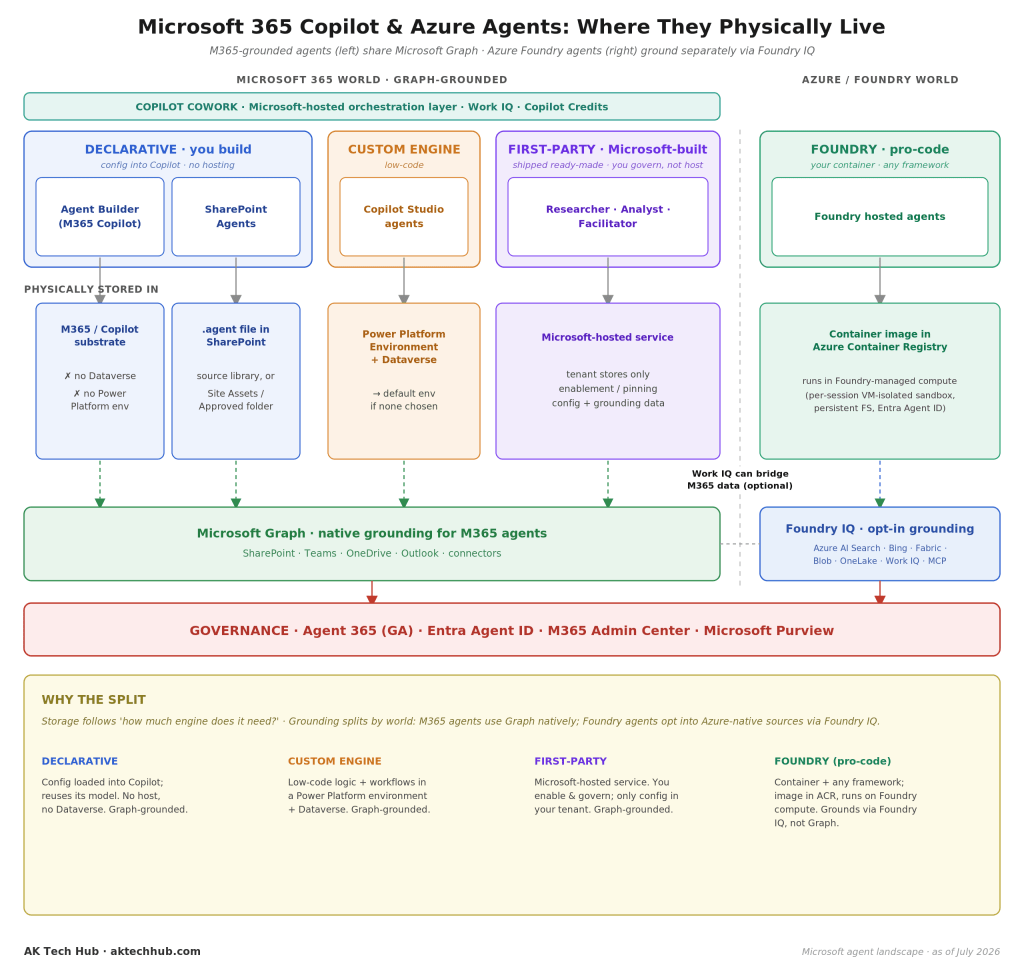
Why “agent” isn’t one thing
An agent, at its simplest, is software that can take a goal expressed in natural language, reason about it, and act, pulling from your data, calling tools and APIs, and completing multi-step work. The trap is assuming they’re all the same thing under the hood. They aren’t. Microsoft’s agents differ mainly along two axes. The first is how much of the “engine” you bring yourself, from just configuration all the way to your own container and framework. The second is where the agent is hosted and grounded, inside the Microsoft 365 world or over in the Azure/Foundry world.
Those two axes give you four practical flavors. Three of them live in the low-code/no-code tower. One lives in the pro-code tower.
Tower one (low-code / no-code)
This tower is grounded natively on Microsoft Graph, meaning your SharePoint, Teams, OneDrive, Outlook, and connector data, plus the newer Work IQ memory layer. It holds three of the four agent types, and it spans the full value range from individual productivity to enterprise-grade solutions.
Declarative agents, the lightest touch (individual and team). These are built with Agent Builder inside Microsoft 365 Copilot, and SharePoint agents fall here too. You aren’t bringing a model or hosting anything. You’re configuring Copilot with custom instructions, knowledge, and actions, and Copilot’s own orchestrator and foundation model do the reasoning. Because there’s no separate engine, there’s nowhere to host. The configuration loads into the Copilot substrate, or lives as a .agent file right in SharePoint. No Dataverse, no Power Platform environment. This is the fastest way to stand up something useful, and for most “help my team answer questions from these documents” scenarios, it’s all you need. The limitation is the flip side of the benefit. You can’t change how it reasons or swap in a different model.
Custom engine agents, bring your own logic (enterprise). When a declarative agent isn’t enough, you graduate to Copilot Studio. Here you bring your own logic, your own orchestration, and even your own model, wired together with low-code workflows. That extra power needs somewhere to run, so a custom engine agent lives in a Power Platform environment backed by Dataverse (it lands in your default environment if you don’t choose one). This is the workhorse for real enterprise automation, such as approval flows, multi-step processes, and integrations with line-of-business systems, without dropping all the way down to pro-code. Because these agents are packaged as Power Platform solution components, they also inherit enterprise-grade application lifecycle management (ALM). You build in a development environment, promote through test and production, keep everything source-controlled through Git, and automate deployment with Power Platform Pipelines, Azure DevOps, or GitHub Actions. In other words, you get the end-to-end ALM discipline usually associated with pro-code, without writing the code.
First-party agents, you enable and Microsoft hosts (individual and team). These are the ready-made agents Microsoft builds and runs itself, such as Researcher, Analyst, Facilitator, and the growing family of role-based agents. You don’t build or host these. You enable them, ground them on your data, and govern them. Only the configuration and grounding data sit in your tenant. The agent itself runs as a Microsoft-hosted service. If the previous two flavors are “build it,” this one is “switch it on.”
Sitting across the top of this tower is Copilot Cowork, a Microsoft-hosted orchestration layer powered by Work IQ that coordinates your M365 agents natively. It’s billed in Copilot Credits and is aimed squarely at individual efficiency, the connective tissue that lets these agents work together on your behalf.
Tower two (pro-code)
The pro-code tower is Microsoft Foundry (formerly Azure AI Foundry) and its Foundry Agent Service. This is where you go when you need full control, meaning any framework, your own endpoints, your own model choices, and multi-agent orchestration patterns.
A Foundry agent is a container image you publish to Azure Container Registry. It runs on Foundry-managed compute, isolated per session in its own VM-backed sandbox with a persistent file system and its own Entra Agent ID. Crucially, it grounds differently from the low-code tower. Instead of Microsoft Graph, Foundry agents ground through Foundry IQ, an opt-in access layer to Azure AI Search, Bing/Web, Fabric, Blob storage, OneLake, Work IQ, and MCP-connected tools. That’s the trade. You leave the convenience of native Graph grounding behind in exchange for near-total control over the engine and its data sources.
This tower is enterprise-grade by design. It’s the right home for agents embedded in custom products, agents that must run untrusted or heavy workloads in isolation, or sophisticated multi-agent systems that coordinate and delegate among themselves.
The bridge between the towers
The two towers aren’t sealed off from each other. An MCP / A2A bridge (Model Context Protocol and agent-to-agent) lets low-code agents reach into Foundry capabilities and lets agents from different worlds talk to each other. In practice this means you can start simple in the low-code tower and call out to a pro-code Foundry agent for the heavy lifting, rather than rebuilding everything in one place. It’s the seam that keeps the two-tower model from forcing an all-or-nothing choice.
What actually makes them differ
Here’s the mental model that ties it together, and it’s the piece most explainers skip. Storage follows a single question. How much engine does the agent need? A declarative agent needs none, so it stores almost nothing. A custom engine agent needs logic and workflows, so it needs a Power Platform environment and Dataverse. A Foundry agent needs a full runtime, so it needs a container and managed compute. The amount of hosting is just a reflection of how much of the engine you brought.
Grounding, meanwhile, splits by world. Everything in the low-code tower grounds on Microsoft Graph natively, which is the whole point of living inside M365. Foundry agents opt into Azure-native sources through Foundry IQ instead. Work IQ can optionally bridge M365 context over to the Foundry side. Get these two ideas (storage follows the engine, grounding follows the world) and you can place any new Microsoft agent Microsoft announces next quarter without waiting for someone to explain it.
The cost dimension
Capability isn’t the only axis that matters. Each tower bills differently, and that shapes real decisions.
The ready-made and declarative experiences ride on per-user Microsoft 365 Copilot licensing, a predictable per-seat cost, easy to budget, but it scales with headcount whether or not every seat is heavily used. Copilot Studio and Copilot Cowork move you toward consumption billing measured in Copilot Credits (message packs or credit packs). You pay for what the agents actually do, which is efficient for targeted automation but needs monitoring so a chatty agent doesn’t surprise you. Foundry is Azure consumption. You pay for compute, model tokens, search, and storage like any other cloud workload, which gives the most control and the most responsibility to keep an eye on spend.
My honest guidance is to not choose a tower on capability alone. A declarative agent that covers the need at a fixed per-seat cost is often the better business decision than a Foundry build that’s technically more elegant and quietly more expensive to run. (Pricing specifics change frequently, so confirm current rates before you commit.)
Governance, the part regulated industries can’t skip
For insurance and other regulated industries, this is where the article earns its keep. Agents aren’t just features. They’re digital workers that read data, call APIs, and take actions. The moment that’s true, the same questions you ask about employees apply to agents. Who is this, what can it access, who’s accountable for it, and can you prove what it did?
Microsoft’s answer is a single governance plane that spans every platform, covering both towers, first-party agents, and even third-party and Foundry agents.
- Agent 365 (generally available) is the control plane, providing centralized observability, policy enforcement, and security for every agent in the tenant.
- Microsoft Entra Agent ID gives each agent its own enterprise identity, so ownership is clear and access is visible. You can apply Conditional Access, access reviews, and lifecycle management to agents the same way you do to people, including retiring an agent’s access when it’s decommissioned.
- Microsoft Purview extends your data governance (sensitivity labels, data loss prevention, and auditing) to what agents can see and surface.
- The Microsoft 365 Admin Center ties enablement and oversight together.
Two governance points deserve special attention in a regulated shop. First, oversharing gets amplified. An agent grounded on Graph will confidently surface anything a user technically has access to, including content that was overshared years ago and never cleaned up. If your permissions and your ROT aren’t in order, agents will find the mess faster than any human ever could. Second, and this is the one closest to my own work, agent interactions are increasingly records. Prompts, responses, and the actions an agent takes on a claim or a policy are business activity, and in a regulated industry that means they carry retention, disposition, and eDiscovery obligations of their own. Governing the fleet isn’t only about security. It’s about treating agent-generated content as part of your records estate.
How to choose, in one pass
- Need to answer questions from a set of documents, fast, for a team? Declarative agent (Agent Builder / SharePoint).
- Need real logic, workflows, or integration with line-of-business systems, without pro-code? Custom engine agent (Copilot Studio).
- Want a proven capability without building anything? First-party agent, which you enable and govern.
- Building agents into a custom product, or need isolation, any framework, and multi-agent orchestration? Foundry (pro-code).
- Whatever you pick, put it under Agent 365, Entra Agent ID, and Purview from day one, and get your permissions and ROT clean before you point agents at your data.
The takeaway
Microsoft’s agent landscape looks sprawling until you hold two ideas in your head. There are two towers (pro-code and low-code/no-code), and storage follows the engine while grounding follows the world. Everything else (declarative, custom engine, first-party, Foundry) is a point on that map. Pick the lightest tool that meets the need, watch the billing model, and never let an agent outrun your governance. In regulated industries especially, the agents are only as trustworthy as the identity, access, and records discipline you put around them.
References (Microsoft Learn)
- Agents for Microsoft 365 Copilot (declarative agents)
- Custom engine agents for Microsoft 365
- What is Copilot Studio?
- What is Foundry Agent Service?
- Microsoft Entra security for AI (Agent ID)
- Governing agent identities (Entra ID Governance)
- Microsoft Agent 365 overview
- Microsoft Purview documentation
Written by Venugopal Pulagam. I write about governance, compliance, AI, and automation in a regulated world at AK Tech Hub. Views are my own, and product details in this fast-moving space change frequently, so verify current capabilities and pricing before making decisions.


Leave a Reply